Corporate event organisers · Social media
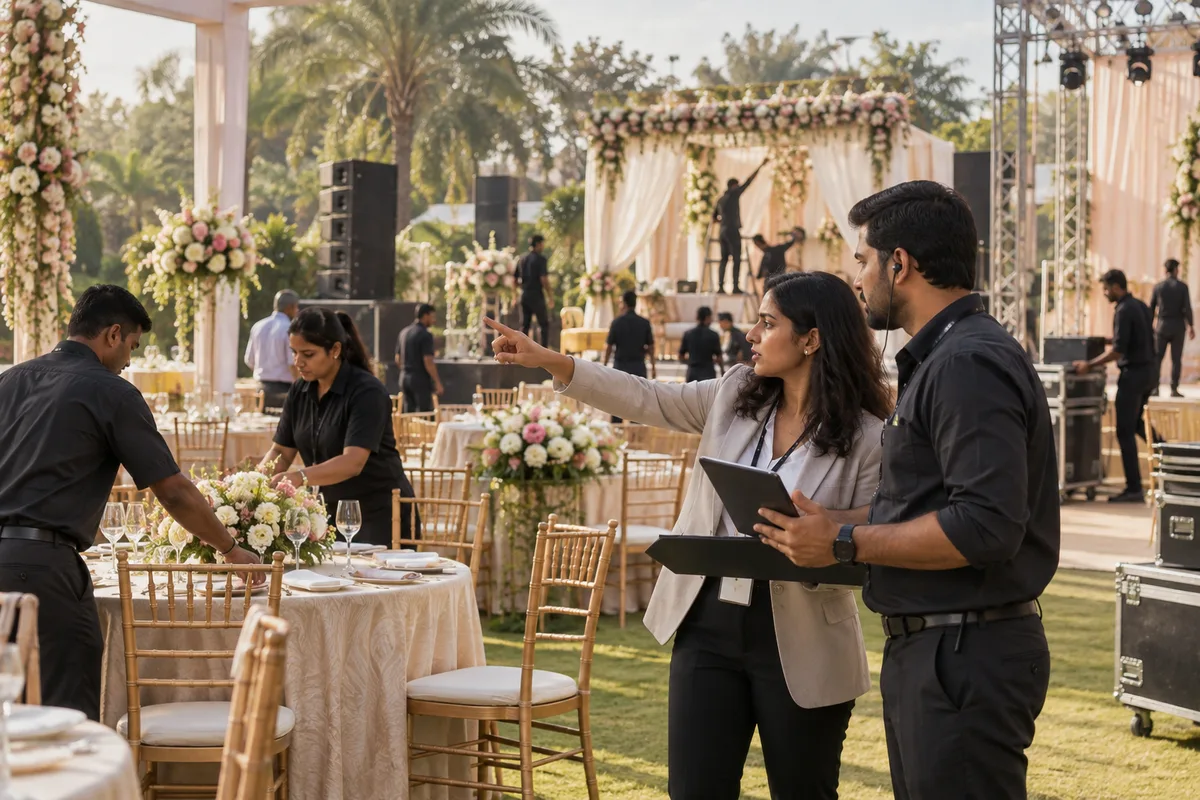
Show the event as the briefer will want to see it: the stage, the floor and the run of show.
Social media marketing for a corporate event organiser is the use of LinkedIn, Instagram and short video to show events you have run to the people who brief the next one. GullySales works on what to post, which event shots tell a buyer something and how a post becomes a conversation.
Scope, fee, reporting and term are agreed in writing after we have read your brief and spoken to you.
What social media means
Social media is the ongoing posting your business does on platforms such as Instagram, Facebook and LinkedIn to stay visible to customers and prospects between purchases. GullySales plans a posting calendar, writes captions and designs the images so the page looks active and answers what a visitor would ask.
Also for corporate event organisers
- Content marketing for corporate event organisers
- Lead generation for corporate event organisers
- SEO for corporate event organisers
- Local SEO for corporate event organisers
- Buyer persona for corporate event organisers
- CRM for corporate event organisers
- Follow-up systems for corporate event organisers
- WhatsApp marketing for corporate event organisers
Sales and marketing for corporate event organisers, the overview.
Last updated 18 Oct 2026.
For corporate event organisers
Where it usually goes wrong, and what we would do.
“The audience is a working professional on LinkedIn”
The marketing head and the HR head scroll LinkedIn between meetings. A post that shows a stage, a seating plan and a short line on what was solved reads like proof. A reel of confetti reads like every other organiser.
“Photographs of guests raise a permission problem”
A company's staff and dealers appear in event photographs. Posting them without the client's agreement can damage a relationship. Decide before the event what may be shared, and agree it with the briefer.
“Behind-the-scenes work is the real differentiator”
Buyers cannot see load-in, rehearsals, stage crew or the backup plan when a speaker is late. Showing the unglamorous parts of a smooth event tells a cautious buyer that you plan for the problem they fear.
“An Instagram feed speaks to a different reader”
Boutique launches and brand events reach marketing teams and agencies who judge by look. The feed should show design and finish, while LinkedIn carries the planning and the process.
What we do
What we deliver for corporate event organisers.
Every deliverable, what it covers for you, and the result it is there to produce. Nothing here is an extra.
A content plan by event type
Posts planned around annual days, dealer meets, launches and offsites, each tied to an event you have run and a point worth making.
Result: A calendar in which every post names an event.
A permissions routine for event photographs
A short written agreement with the client about which photographs, names and logos may be shared, kept with the event file.
Result: Each event file holds the client's agreement on sharing.
Run-of-show carousels
A post that walks through how a day was laid out, with times and tasks, so a planner can see the thinking.
Result: Carousels a briefer could forward to finance.
Short video of set-up and rehearsal
Phone-shot clips of load-in, sound checks and stage build, edited with a plain caption on the problem being solved.
Result: Clips that show the work behind the finish.
A reply routine for comments and messages
Who answers, in what words and how an enquiry is passed to sales and logged.
Result: Every enquiry from a post reaches the lead sheet.
A record of what each post brought
Enquiries and conversations traced to posts, so you can see which format draws briefs and which draws applause.
Result: A sheet showing which posts led to a conversation.
How the result is measured
- Posts published
- Engagement rate
- Enquiries from social profiles
Recorded as a baseline before work starts, so every later report has an honest comparison.
Posts and pieces to plan
Plan posts that show how an event is built.
- Stage build timelapse
- A short video of an empty hall becoming a stage, with the client's permission for any branding visible.
- Run-of-show carousel
- Slides that show the sequence of a dealer meet from registration to dinner, with names removed.
- Rehearsal day lessons
- A LinkedIn post on what the sound check caught, with a photograph of the crew and no guests in frame.
- Venue walk-through for planners
- A reel of a venue's halls and rooms with the capacity each handles, for HR heads comparing options.
- What went wrong and how we fixed it
- A plain account of a delayed speaker or a failed projector and the backup used, which builds trust with finance readers.
Who it is for
This is written for these corporate event organisers.
- Organisers of annual days, town halls and employee engagement events
- Product launch and dealer meet specialists for manufacturers and consumer brands
- Offsite and incentive trip organisers for sales teams
- Corporate gifting and conference-support companies that run events
- Organisers for IT and BPO companies with large employee bases
- Organisers focused on pharma, insurance and banking meets
- Boutique agencies that run a few brand events a year
- Organisers that manage events on behalf of an advertising or PR agency
Not for
It is not the right fit if.
- You have no permission from past clients to show their events, so the feed would have little real to post
- No one on your team can take clean photographs during an event, so posts would rely on stock images
- Your briefs come only through agencies that forbid you from showing their client work
How it works
How the social media work runs
The work itself, in order. How an engagement starts, from your brief to a written scope, is set out on our method page.
- 1
Confirm audience, platforms and access
We note which platforms your buyers use and check that the pages sit under your own business accounts, with you as owner and us as added roles.
- 2
Review the current presence
We read the existing pages, the posts that drew replies and the gaps in posting.
- 3
Build the calendar
Themes, formats and dates are set out for your approval, with space for offers and news.
- 4
Create, approve and publish
Posts are made, approved by you and scheduled. Replies to the public are handled in your voice.
- 5
Record enquiries and adjust
Enquiries are logged against the post or platform where they began, and the mix changes to follow what brings them.
Where this fits
Three pieces of sales work, in this order.
This work sits inside sales process design, at stage 0, foundation. The audit comes before it, and sales management keeps it running.
Step 1
Sales audit
Find where deals are being lost and what to fix first.
Start here if you cannot say where orders are lost.
Step 2 · you are here
Sales process design
One written way to sell, from first enquiry to repeat order.
Start here if every salesperson sells differently.
Step 3
Sales management
A target, a review routine and someone who owns the number.
Start here if the team has targets and no routine.
FAQ
Questions owners ask before they call.
Not here? More answers, or ask on WhatsApp.
Should we post client logos?
Is Instagram or LinkedIn better for us?
Should we run paid social?
Can we post photographs of guests at a client event?
Can we post photographs of guests at a client event?
How much does it cost?
How long is the contract?
How soon will we see results?
Who will actually do the work?
What do you need from us?
More for corporate event organisers
Everything else we would do for you.
Closest to this: content and social
Also for corporate event organisers
Or start from the overview: sales and marketing for corporate event organisers.
Your next practical step
Tell us what you are trying to grow, and we will read it before we call.
Eight short steps, mostly taps. Skip anything you would rather answer on the call.