Supermarkets · Social media
Show the shelf and the counter on the day, because a supermarket sells today's stock.
Social media marketing for a supermarket is the use of Instagram, Facebook and local groups to show what is on the shelf today and to keep nearby households in mind. GullySales works on the posts, the groups and the replies that connect to a visit.
Scope, fee, reporting and term are agreed in writing after we have read your brief and spoken to you.
What social media means
Social media is the ongoing posting your business does on platforms such as Instagram, Facebook and LinkedIn to stay visible to customers and prospects between purchases. GullySales plans a posting calendar, writes captions and designs the images so the page looks active and answers what a visitor would ask.
Last updated 14 Nov 2026.
For supermarkets
Where it usually goes wrong, and what we would do.
“A post is useful only if the family can reach the store”
A reel about a bakery shelf reaches people across the city who will never drive there. The audience that matters lives within the delivery radius and the residents' groups, so the posts are set up and shared for those streets.
“Fresh arrivals are the content”
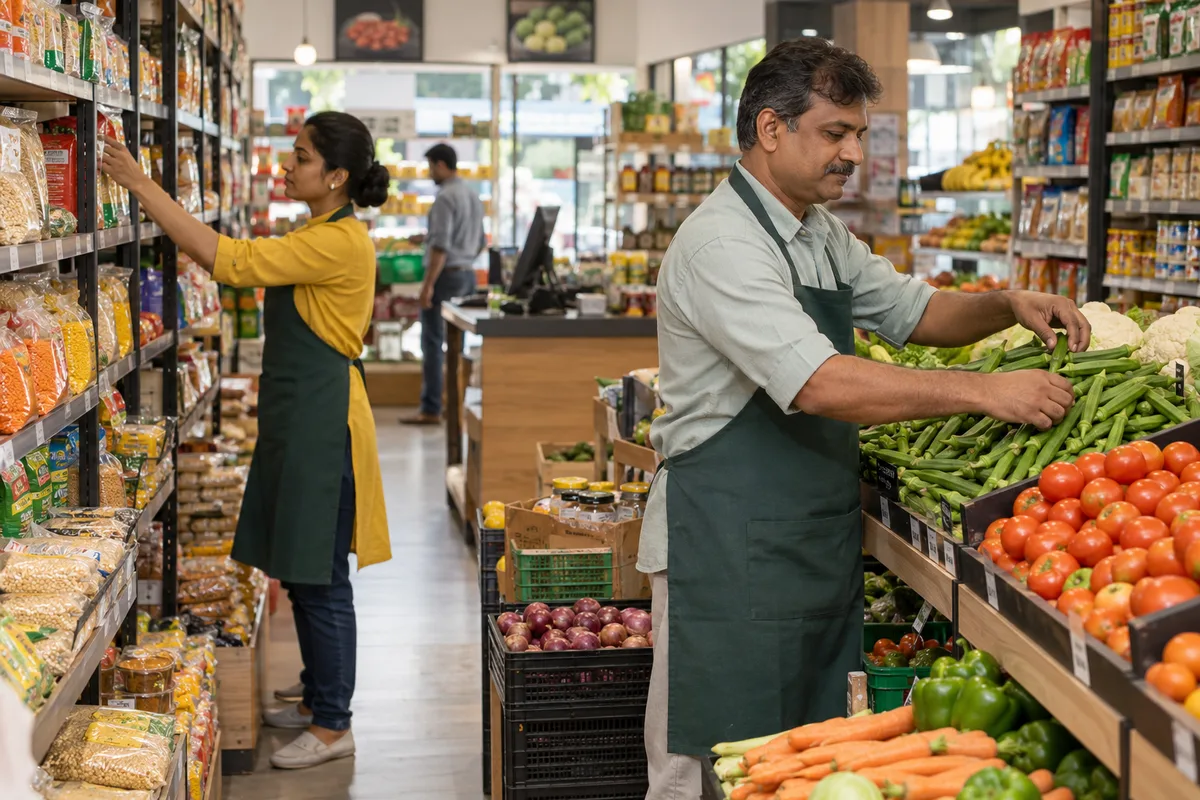
The day's vegetables, the fish or meat counter where it exists and the bakery tray change every day, and a buyer wants to know what came in. A photograph taken at the shelf does more than a designed festival poster.
“The comments are enquiries”
Families ask whether an item is in stock, what the price is and whether it can be delivered. A comment left for a day sends the buyer to the next store, so someone at the store owns the replies.
“Residents' groups carry more weight than a store page”
A recommendation from a neighbour in the apartment group outweighs the store's own post. The store earns that by a good basket and a reachable manager, and by sharing offers in a form the secretary can forward.
What we do
What we deliver for supermarkets.
The work available for this need. We agree the deliverables and responsibilities for your engagement in writing.
A posting plan built around the shop floor
A set of recurring post types, such as the day's arrivals, a section tour and a festival list, each with a person at the store who takes the photograph.
Result: The store manager knows what to photograph and when.
Photographs and short videos from the shelf
Guidance on framing the fresh section, the bakery and the new arrivals in daylight on an ordinary phone.
Result: Posts show the real shelf and not a stock image.
A reply guide for comments and messages
Short, polite answers for price, stock, timings and delivery, with the point at which a query moves to WhatsApp.
Result: A comment about a price gets a consistent answer.
Group-ready offer cards
A simple, legible offer image with dates and the delivery slot that an association secretary can forward in a group.
Result: The offer travels in the groups with the store name on it.
A festival calendar of posts
Ugadi, Diwali, Eid, Christmas and local festivals planned with the hamper list and the booking date.
Result: Hamper bookings are planned from orders and not from guesswork.
How the result is measured
- Posts published
- Engagement rate
- Enquiries from social profiles
Recorded as a baseline before work starts, so every later report has an honest comparison.
Posts and pieces to plan
Posts a supermarket can make from what arrived on the shelf today.
- Vegetable and fruit arrival of the day
- A photograph of the counter with the name of the produce and the day. A family can reach the store today, so a post of today's stock is useful.
- A section walk-through: staples aisle
- A short video from the entrance to the rice, oil and atta rows with shelf labels visible. It helps a new family find things before the first visit.
- Bill-time reminder of a new brand on the shelf
- A post naming one new brand with its price on the day. Keep it factual, and remove it once the stock ends.
- Festival basket contents
- A photograph of the actual basket with every item named and the price. Spell out what is inside so there is no surprise at the counter.
- A reply to a family question in the comments
- Answer a stock or timing question in public. Others see it, and the comments work as a notice board for the locality.
Who it is for
This is written for these supermarkets.
- Single-store supermarkets of one floor in a residential locality
- Two-floor supermarkets with a dedicated household and general merchandise section
- Supermarkets inside apartment complexes and gated townships
- Small chains of three to ten stores in one city
- Supermarkets attached to a wholesale or cash-and-carry outlet
- Family-run supermarkets in smaller towns that serve the surrounding villages
- Cooperative and society-run supermarkets
- Supermarkets that serve a hospital, college or industrial campus
Before you decide
When this may not be the right fit.
- Nobody checks stock before a post goes up, so you would advertise items the shelf no longer has.
- You plan to boost every post, though a post is useful only to families who can reach the store.
- Staff are not available to answer comments and messages during the day.
Before you decide
Agree the work. Know how to judge it.
Social media marketing for supermarkets: use these checks to prepare, choose the scope, and review what changes.
Bring the right evidence
Review the posts that produced useful conversations, not only the ones with the most views. Gather buyer questions and decide which team member can contribute credible material.
Make the scope clear
Choose the audience and channel before setting a posting volume. Agree who supplies material, approves posts, and handles messages, including complaints or questions the agency cannot answer.
Check the work in use
Follow a post through to the profile, website, and response. A useful report explains the quality of conversations and enquiries, alongside reach and engagement.
Know when to change course
If publishing takes time away from unanswered buyer messages, fix the response routine first. Do not expand to another channel without a clear reason for being there.
These are discussion points, not a fixed package. GullySales confirms the deliverables, responsibilities, fee, and term in writing after reading your brief and speaking with you.
Before we start
What to have ready before the work starts.
The records, access and decisions this work needs from supermarkets. Anything missing is noted in the written scope, with who will supply it.
- Admin access to the store's social pages
- The logins for the store's Instagram and Facebook pages, with the name of the person who holds each. Old accounts count too. Without them we cannot post or read figures, and we will not post from a personal profile.
- A phone and a person to take photographs
- One staff member with a decent phone who can photograph the shelves when stock arrives. Quality matters less than being current. Without a photographer, the page runs on supplier images, which families scroll past.
- The supplier schemes running now
- A list of the schemes and display offers currently on, with dates, from the buying desk. A post about an offer that has ended damages trust. If the list is missing, posts avoid offers and describe fresh arrivals only.
- The festival dates the store trades around
- The dates of the regional and family festivals that move the store's sales, as the manager knows them. They shape the calendar. Without them, we use a general calendar that may miss the occasions your households actually shop for.
- A name for the person who replies
- One person responsible for comments and messages, with a stand-in for off days. An unanswered question on a store page is read as indifference. Without a named person, we recommend that comments stay switched off.
How it works
How the social media work runs
The work itself, in order. How an engagement starts, from your brief to a written scope, is set out on our method page.
- 1
Photograph what arrived at the dock this morning
We begin on the shop floor at the time stock comes in, photographing fresh arrivals, new items and the day's displays with the manager. You tell us what the store is proud of and what it does not want shown. This gives us a bank of real shelf photographs, which are the raw material for every post that follows.
- 2
Find the groups the neighbourhood already uses
We list the residents' groups, school parent groups and office circles where the area talks about shopping, noting who administers each and what they allow. You identify groups where the store has a friend. We do not post unasked; the list shows where an invitation or a share from a resident is possible.
- 3
Plan a month of posts around the shelf
The store manager and we sit with the festival calendar and the supplier schemes and place posts against them: seasonal arrivals, a festival basket, a fresh-section note. You approve the plan, and the manager confirms the stock behind each post is real. The plan lists the post, the photograph and the person who shoots it.
- 4
Make offer cards ready to share in groups
We design simple offer cards sized for phone screens and group sharing, each with one offer, the dates and the address, with no crowded poster text. You approve every claim and date. The cards are saved in a folder so a resident or staff member can forward them without a designer.
- 5
Draft a guide for answering shoppers online
We write a short guide for whoever answers comments and messages: what to say about an item that has run out, a price that differs at the counter, a request for delivery. You name the person who replies. A comment about a bad bill moves to a call, never stays in the thread.
- 6
Read profile visits and counter mentions
We compare profile visits, messages and shares with the figures recorded before posting began, and ask the cashiers how many households mentioned a post. You choose which post styles deserve a repeat. Nothing is promised in advance; the reading shows which posts brought people to the store.
Where this fits
Three pieces of sales work, in this order.
This work sits inside sales process design, at stage 0, foundation. The audit comes before it, and sales management keeps it running.
Step 1
Sales audit
Find where deals are being lost and what to fix first.
Start here if you cannot say where orders are lost.
Step 2 · you are here
Sales process design
One written way to sell, from first enquiry to repeat order.
Start here if every salesperson sells differently.
Step 3
Sales management
A target, a review routine and someone who owns the number.
Start here if the team has targets and no routine.
FAQ
Questions owners ask before they call.
Not here? More answers, or ask on WhatsApp.
Which platform matters most for a supermarket?
Should we run paid posts?
Who should reply to comments?
Who should reply to comments?
Can staff appear in the posts?
Should the store post prices?
How long is the contract?
How soon will we see results?
Who will actually do the work?
What do you need from us?
More for supermarkets
Related work to consider.
Closest to this: content and social
Also for supermarkets
Or start from the overview: sales and marketing for supermarkets.
Your next practical step
Tell us what you are trying to grow, and we will read it before we call.
Eight short steps, mostly taps. Skip anything you would rather answer on the call.